
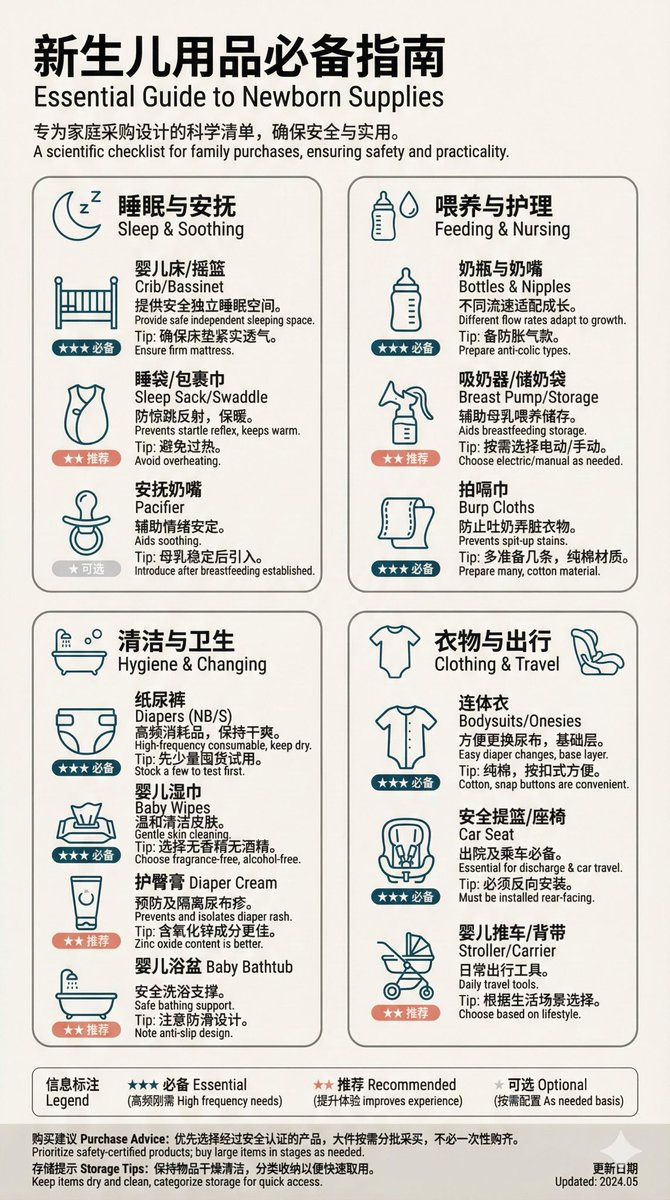
Prompt-Bibliothek / Swiss High-End Design Style Newborn Essentials Checklist Infographic
Swiss High-End Design Style Newborn Essentials Checklist Infographic

Swiss High-End Design Style Newborn Essentials Checklist Infographic

Autor:@yyyole
52500
Text-zu-Bild
nano banana
nano banana pro
qwen image edit
z-image-turbo
Create an infographic of 【Newborn Essentials Checklist】, Swiss high-end design style, for family shopping guide. **Design style requirements:** - Adopt Swiss design aesthetics: minimalism, grid system, clear hierarchy - Color scheme: use 2-3 main colors, paired with neutral colors (white, light gray, dark gray) - Layout adopts strict grid layout, ample white space, strong visual breathing room - Font hierarchy: title uses sans-serif bold, body uses readable sans-serif font - Icon style: linear icons or flat icons, consistent style **Content structure:** 1. **Top title area** - Main title: Newborn Essentials Checklist - English subtitle: - Brief description (1-2 sentences) 2. **Category display area (4-6 categories)** Each category includes: - Simple linear icon) - Category name - 3-5 specific items - Key information for each item: * Name * Purpose/function (concise) * Usage suggestions or precautions * Recommendation level or importance indicator 3. **Information annotation** - Use icon + text combination - Color coding to distinguish different importance levels - Add concise usage tips 4. **Bottom information bar** - Purchase suggestions - Storage tips - Update date identifier **Visual elements:** - Use thin lines to separate different areas - Rounded rectangle or square frame surrounding content modules - Moderate use of shadows to add layering - Icon and text ratio coordinated, not exceeding 3:7 **Information density:** - Total number of items: 15-25 - Control each item information to 30-50 words - Ensure information is practical, accurate, and easy to reference **Size suggestion:** - Vertical poster: 1080x1920 **Output requirements:** - High definition - Printable quality - Bilingual Chinese and English annotation (optional)

Beschreibung

Create a Swiss high-end design style infographic for a Newborn Essentials Checklist using z-image as a family shopping guide. Adopt minimalism, grid system, and clear hierarchy. Use 2-3 main colors with neutral tones, strict grid layout, and ample white space. Include top title area, category display area, information annotation, and bottom information bar. Ensure practical, accurate, and easy-to-reference information.
Tags
# grid system
# infographic
# newborn essentials
# Swiss design
# shopping guide
# minimalism

Verwandte Prompts

Extended Vertical Image - Timeline of Chinese Dynasties

Extended Vertical Image - Timeline of Chinese Dynasties

Full Body Portrait from Extreme High Angle, Conveying Isolation and Vulnerability
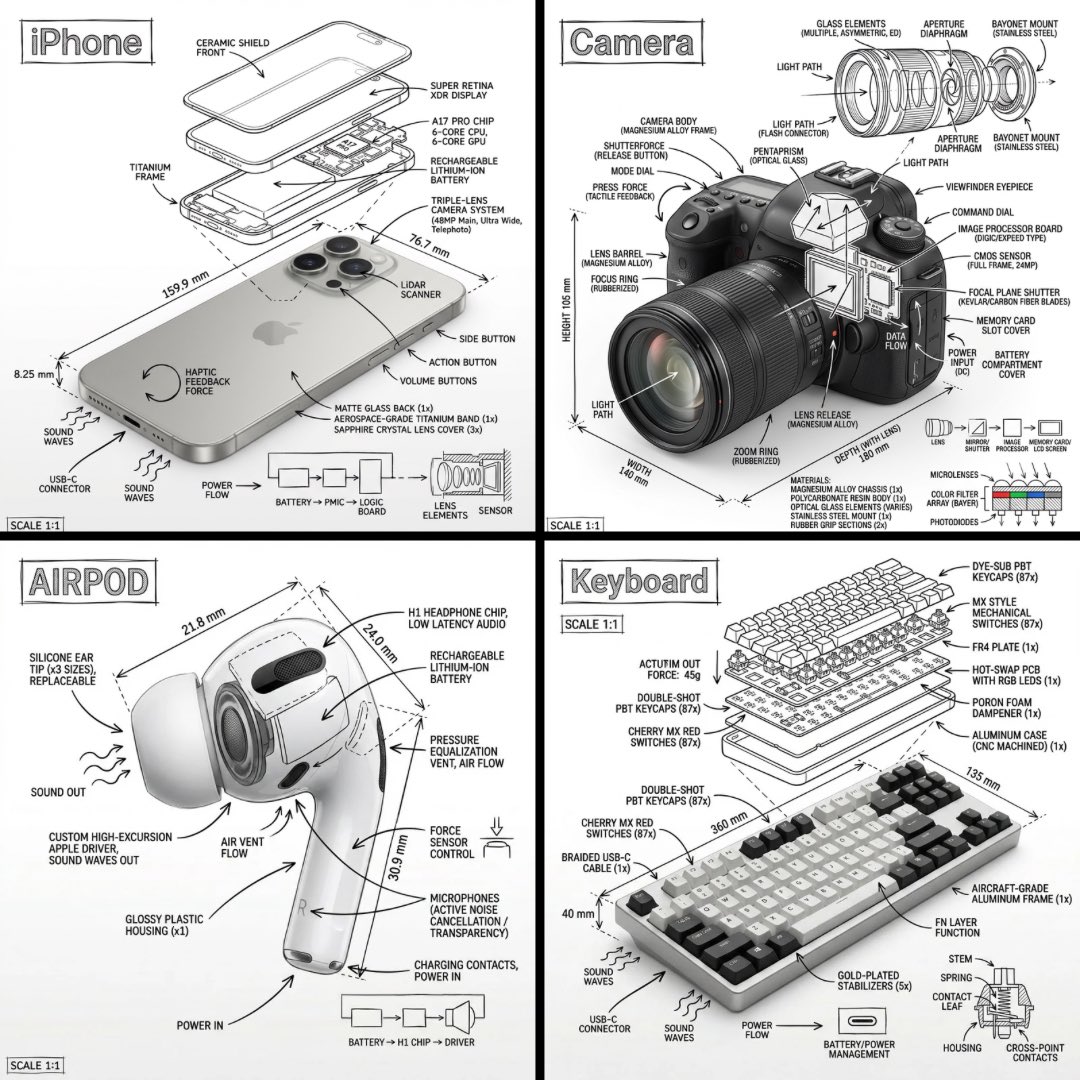
Full Body Portrait from Extreme High Angle, Conveying Isolation and Vulnerability

Create an infographic image of [OBJECT], combining a realistic photograph or photoreal render of the object with technical annotation overlays placed directly on top.

Create an infographic image of [OBJECT], combining a realistic photograph or photoreal render of the object with technical annotation overlays placed directly on top.

Create a Cartoon-Style Infographic Based on Provided Content

Create a Cartoon-Style Infographic Based on Provided Content

Minimalist Still Life in High-End Product Photography Style

Minimalist Still Life in High-End Product Photography Style

Museum-Grade Fish Knowledge Infographic Design

Museum-Grade Fish Knowledge Infographic Design

Beliebte Tools

Entdecken Sie unsere beliebtesten Kreativ-Tools

Z-Image Bearbeitung

Bild hochladen, mit einem Satz transformieren

Jetzt ausprobieren

Kreativ-Engine

Ein Satz, KI bietet unendliche Prompt-Kreativität.

Jetzt ausprobieren

Bild-Analyse

Bild hochladen, Prompt sofort erhalten.

Jetzt ausprobieren

Z-Image LoRA

Kombinieren Sie mehrere LoRA-Modelle, um einzigartige KI-Kunstwerke zu erstellen

Jetzt ausprobieren

Z-Video

Generate creative videos from text or images with AI.

Jetzt ausprobieren

KI-Bildgenerator

Verwandeln Sie Ihren Text sofort in atemberaubende Bilder.

Jetzt ausprobieren

Stil-Bibliothek

Entdecken Sie kuratierte Kunststile für Ihre Kreationen.

Jetzt ausprobieren

Hintergrund entfernen

Entfernen Sie Hintergründe sofort mit KI-Präzision.

Jetzt ausprobieren

Bild-Upscaler

Verbessern Sie die Bildauflösung auf bis zu 4K/8K.

Jetzt ausprobieren

Bild-Reframe

Erweitern Sie Bilder mit Outpainting auf jedes Seitenverhältnis.

Jetzt ausprobieren

Camera Angle

Create a new view with continuous 3D camera control.

Jetzt ausprobieren

Image Layers

Split an image into editable transparent layers.

Jetzt ausprobieren

Image Parallax

Turn one image into interactive parallax animation.

Jetzt ausprobieren

Bild zu ASCII

Wandeln Sie Bilder lokal im Browser in anpassbare ASCII-Kunst um.

Jetzt ausprobieren

GIF zu ASCII

Verwandeln Sie animierte GIFs in herunterladbare ASCII-Animationen.

Jetzt ausprobieren

Video zu ASCII

Konvertiere MP4-, WebM- oder MOV-Clips in herunterladbare ASCII-Videos.

Jetzt ausprobieren

Video zur Tiefenkarte

Erstellen Sie lokal im Browser ein privates Tiefenkarten-Video.

Jetzt ausprobieren