
提示詞庫 / Infographic / Edu Visual - Foxy App Icon Exploration Board
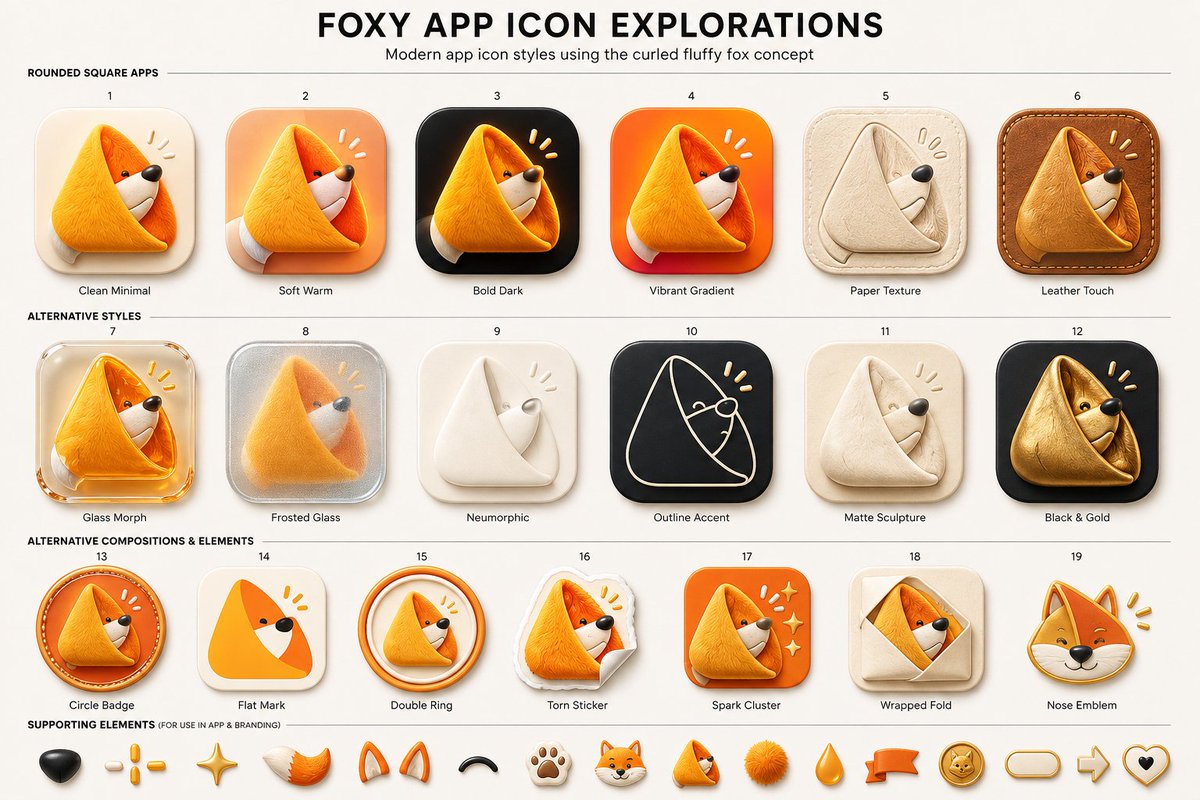
Infographic / Edu Visual - Foxy App Icon Exploration Board
文生圖
gpt-image-2
Goal: Create a clean presentation board titled {argument name="headline text" default="FOXY APP ICON EXPLORATIONS"}, showing modern app icon style variations for a cute curled fluffy fox logo concept.
Canvas: Wide 16:9 beige/off-white design board, high-resolution, centered composition, subtle paper background. At the top, a large bold black all-caps headline, with a smaller subtitle underneath: {argument name="subtitle text" default="Modern app icon styles using the curled fluffy fox concept"}. Use thin horizontal divider lines to separate sections.
Layout: Arrange exactly 19 numbered app icon concepts in a neat grid of 3 rows: first row has 6 icons, second row has 6 icons, third row has 7 icons. Each icon is a rounded-square or badge-style app icon featuring the same curled triangular fox mascot: a fluffy orange fox curled into a soft triangular fold, with a white muzzle, tiny black eye, black nose, and small yellow attention marks near the head. Put a small number above each icon and a short label below it.
Section 1 title: “ROUNDED SQUARE APPS”. Include exactly 6 icons:
1. Clean Minimal — cream rounded-square background, soft shadow, simple orange curled fox.
2. Soft Warm — peach/orange warm gradient rounded-square background.
3. Bold Dark — black rounded-square background with glowing orange fox.
4. Vibrant Gradient — bright orange-red gradient rounded-square background.
5. Paper Texture — beige paper-like icon, embossed folded fox in pale cream.
6. Leather Touch — brown stitched leather rounded-square background, tan leather fox.
Section 2 title: “ALTERNATIVE STYLES”. Include exactly 6 icons:
7. Glass Morph — translucent glossy glass rounded-square icon with orange fox.
8. Frosted Glass — frosted silver translucent square with blurred fox inside.
9. Neumorphic — soft off-white raised icon with minimal white folded fox.
10. Outline Accent — dark charcoal rounded square with thin cream line-art fox outline and yellow accent marks.
11. Matte Sculpture — soft beige matte clay-like curled fox sculpture.
12. Black & Gold — black rounded square with metallic gold fox.
Section 3 title: “ALTERNATIVE COMPOSITIONS & ELEMENTS”. Include exactly 7 icons:
13. Circle Badge — circular orange badge with curled fox inside and stitched/ring detail.
14. Flat Mark — simplified flat orange triangular fox mark on cream rounded square.
15. Double Ring — curled fox inside two circular orange rings.
16. Torn Sticker — fox printed as a torn paper sticker with curled paper corner.
17. Spark Cluster — orange rounded square with fox and small sparkle/star cluster.
18. Wrapped Fold — beige square with fox peeking from a folded envelope/wrap shape.
19. Nose Emblem — fox head emblem focused on face, ears, black nose, and yellow marks.
Supporting elements: Along the bottom, add a row labeled “SUPPORTING ELEMENTS (FOR USE IN APP & BRANDING)” containing exactly 14 small mascot/brand elements: black nose, three yellow dash marks, golden sparkle star, orange-white fluffy tail, pair of orange fox ears, black curved smile/arc, paw print, small fox head, tiny curled fox mascot, orange fluffy pom-pom, orange teardrop, orange ribbon banner, gold fox coin badge, rounded pill outline, right arrow outline, and heart outline with black center. If space is tight, keep the first 14 most visible items and maintain the same visual style.
Visual style: Premium UI concept sheet, polished 3D soft-rendered icons, rounded corners, tactile materials, gentle shadows, warm orange and cream palette with black accents. Use crisp readable typography, small labels, even spacing, and a modern product-design presentation aesthetic. The mascot should remain consistently recognizable across all variations as a {argument name="mascot description" default="curled fluffy orange fox forming a triangular app icon shape"}. Avoid extra icons, extra labels, watermarks, or photorealistic background clutter.
描述
A structured prompt for generating a polished 19-variant app icon exploration sheet featuring a curled fluffy fox mascot in multiple UI styles.
標籤
# YouMind
# gpt-image-2
# image prompt
熱門工具
探索最受歡迎的創意工具
Z-Image Edit
上傳圖片,一句話即可改變一切。
立即體驗
創意引擎
一句話讓 AI 為你提供無限提示詞創意
立即體驗
圖像解析
上傳圖片,立即讀取提示詞
立即體驗
Z-Image LoRA
結合多個 LoRA 模型,創作獨特的 AI 藝術品
立即體驗
Z-Video
Generate creative videos from text or images with AI.
立即體驗
AI 繪圖生成器
輸入文字,瞬間轉化為精美的 AI 繪圖作品。
立即體驗
樣式庫
探索精心挑選的藝術風格,為您的創作增色。
立即體驗
智能去背
一鍵移除圖片背景,實現專業級高精度去背。
立即體驗
畫質增強
將圖片無損放大至 4K/8K,恢復清晰細節。
立即體驗
圖片重構
使用 AI 外繪技術將圖片擴展至任意比例背景。
立即體驗
鏡頭控制
使用連續 3D 鏡頭控制生成自由視角。
立即體驗
圖片分層
將圖片拆分為可編輯透明圖層。
立即體驗
圖片視差
將一張圖片變成可互動的視差動畫。
立即體驗
圖片轉 ASCII
在瀏覽器本機將圖片轉換為可自訂的 ASCII 字元畫。
立即體驗
GIF 轉 ASCII
將動態 GIF 轉換成可下載的 ASCII 字元動畫。
立即體驗
影片轉 ASCII
將 MP4、WebM 或 MOV 轉換為可下載的 ASCII 影片。
立即體驗
影片轉深度圖
在瀏覽器本機生成私密的深度圖影片。
立即體驗