
프롬프트 라이브러리 / Vintage Film Style Portrait with Red Lollipop
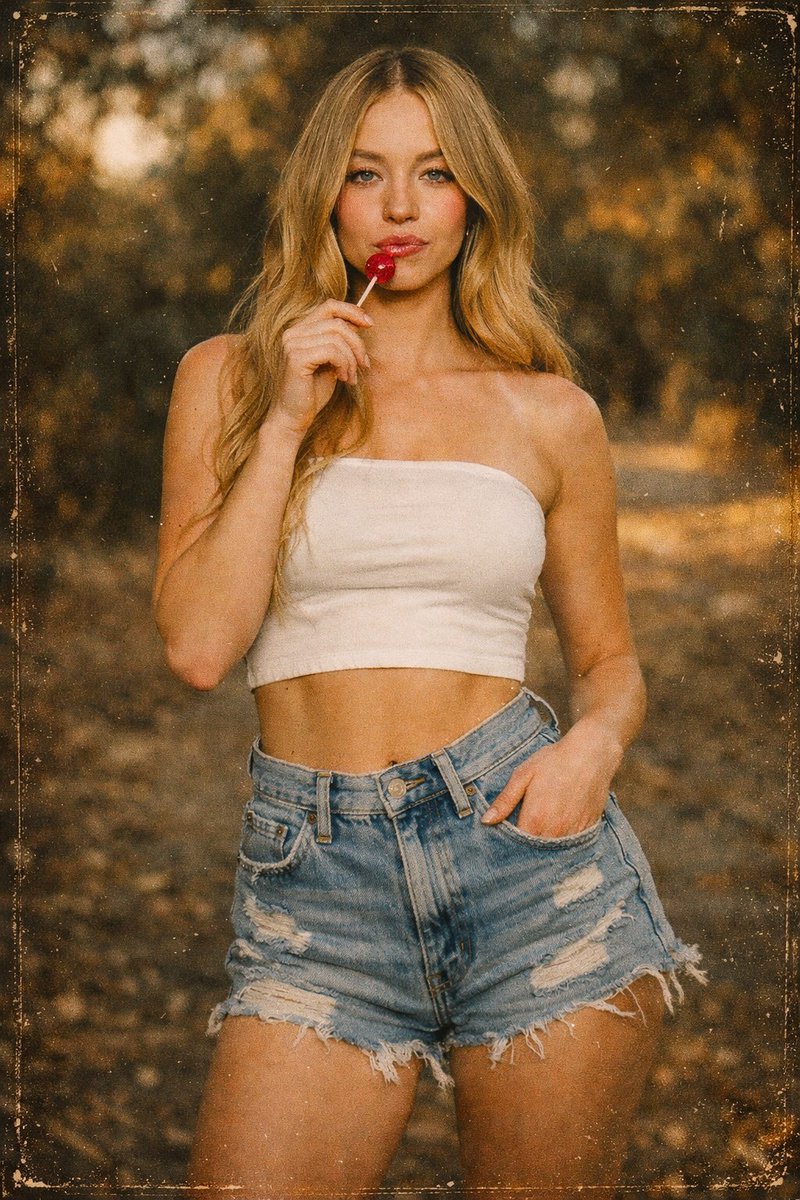
Vintage Film Style Portrait with Red Lollipop
작성자:@23rd_Pulikesi
000
텍스트-이미지
Nano banana pro
{ "prompt": "Use the uploaded reference image as the absolute identity anchor. Preserve the subject’s facial features, facial proportions, bone structure, eyes, nose, lips, skin tone, hairline, hair texture, body shape, and overall likeness with maximum fidelity. Do not beautify, idealize, or alter the person in any way. A cinematic, vintage-style outdoor portrait of the same person. For each generation, vary the subject’s pose naturally (e.g., slight body angle changes, subtle lean, head tilt, arm positioning) while keeping the same prop: a bright red lollipop held near the lips or face. Maintain a calm, confident expression. The subject wears a white strapless bandeau top and high-waisted light-blue distressed denim shorts. Lighting is soft, warm, and natural during golden hour. The image has a strong analog film aesthetic with heavy grain, dust, scratches, subtle fading, and a warm brown-orange color cast, resembling an old 35mm photograph. Background is softly blurred with shallow depth of field. Framing remains cinematic and consistent.", "identity_preservation": { "face_likeness": "maximum", "body_proportions": "exact_match", "hair": "match_reference" }, "pose_variation": { "enabled": true, "mode": "random_per_generation", "constraints": [ "natural human poses only", "no extreme or distorted angles", "no change to body shape or identity" ] }, "prop": { "name": "red lollipop", "consistency": "same_prop_every_generation" }, "style_keywords": [ "vintage film photography", "analog grain", "cinematic portrait", "retro aesthetic", "natural light", "shallow depth of field", "realistic skin texture" ], "camera_settings": { "lens": "35mm", "aperture": "f/1.8", "iso": 800, "film_grain": "heavy", "vignette": "light" }, "negative_prompt": [ "face change", "different person", "altered identity", "idealized beauty", "smooth plastic skin", "CGI", "illustration", "digital HDR look", "modern studio lighting", "missing prop", "changed prop" ], "generation_settings": { "image_weight": "1.5–2.0", "face_consistency": "max", "denoising_strength": "0.2–0.35", "cfg_scale": "low_to_medium", "aspect_ratio": "16:9" } }
설명
Create vintage film portraits with z-image, preserving identity. Model holds a red lollipop, wearing white top and denim shorts, with 35mm grain and warm tones.
태그
# Natural Light
# Vintage Film
# Cinematic Portrait
# Red Lollipop
# Identity Preservation
인기 도구
가장 인기 있는 크리에이티브 도구 살펴보기
Z-Image 편집
이미지를 업로드하고 한 문장으로 변화를 주세요.
지금 시도하기
크리에이티브 엔진
한 문장으로 AI가 무한한 프롬프트 창의성을 제공합니다.
지금 시도하기
이미지 파싱
이미지를 업로드하고 즉시 프롬프트를 받으세요.
지금 시도하기
Z-Image LoRA
여러 LoRA 모델을 결합하여 고유한 AI 예술 작품을 만듭니다
지금 시도하기
Z-Video
Generate creative videos from text or images with AI.
지금 시도하기
AI 이미지 생성기
텍스트를 즉시 멋진 이미지로 변환하세요.
지금 시도하기
스타일 라이브러리
창작물을 위해 엄선된 예술적 스타일을 탐색하세요.
지금 시도하기
배경 제거
AI를 사용하여 배경을 즉시 제거하고 정밀한 누끼 작업을 수행합니다.
지금 시도하기
화질 개선
이미지를 4K/8K로 업스케일링하여 선명한 디테일을 복원합니다.
지금 시도하기
리프레임
AI 아웃페인팅 기술을 사용하여 이미지를 모든 비율로 확장합니다.
지금 시도하기
Camera Angle
Create a new view with continuous 3D camera control.
지금 시도하기
Image Layers
Split an image into editable transparent layers.
지금 시도하기
Image Parallax
Turn one image into interactive parallax animation.
지금 시도하기
이미지 ASCII 변환
브라우저에서 이미지를 사용자 지정 ASCII 아트로 변환하세요.
지금 시도하기
GIF ASCII 변환
움직이는 GIF를 다운로드 가능한 ASCII 애니메이션으로 변환하세요.
지금 시도하기
비디오를 ASCII로
MP4, WebM 또는 MOV 영상을 다운로드 가능한 ASCII 비디오로 변환합니다.
지금 시도하기
비디오 깊이 맵 변환
브라우저에서 비공개 깊이 맵 비디오를 로컬로 만드세요.
지금 시도하기