
프롬프트 라이브러리 / Infographic / Edu Visual - Industrial Heritage Open Day Poster
Infographic / Edu Visual - Industrial Heritage Open Day Poster
작성자:小小东
000
텍스트-이미지
gpt-image-2
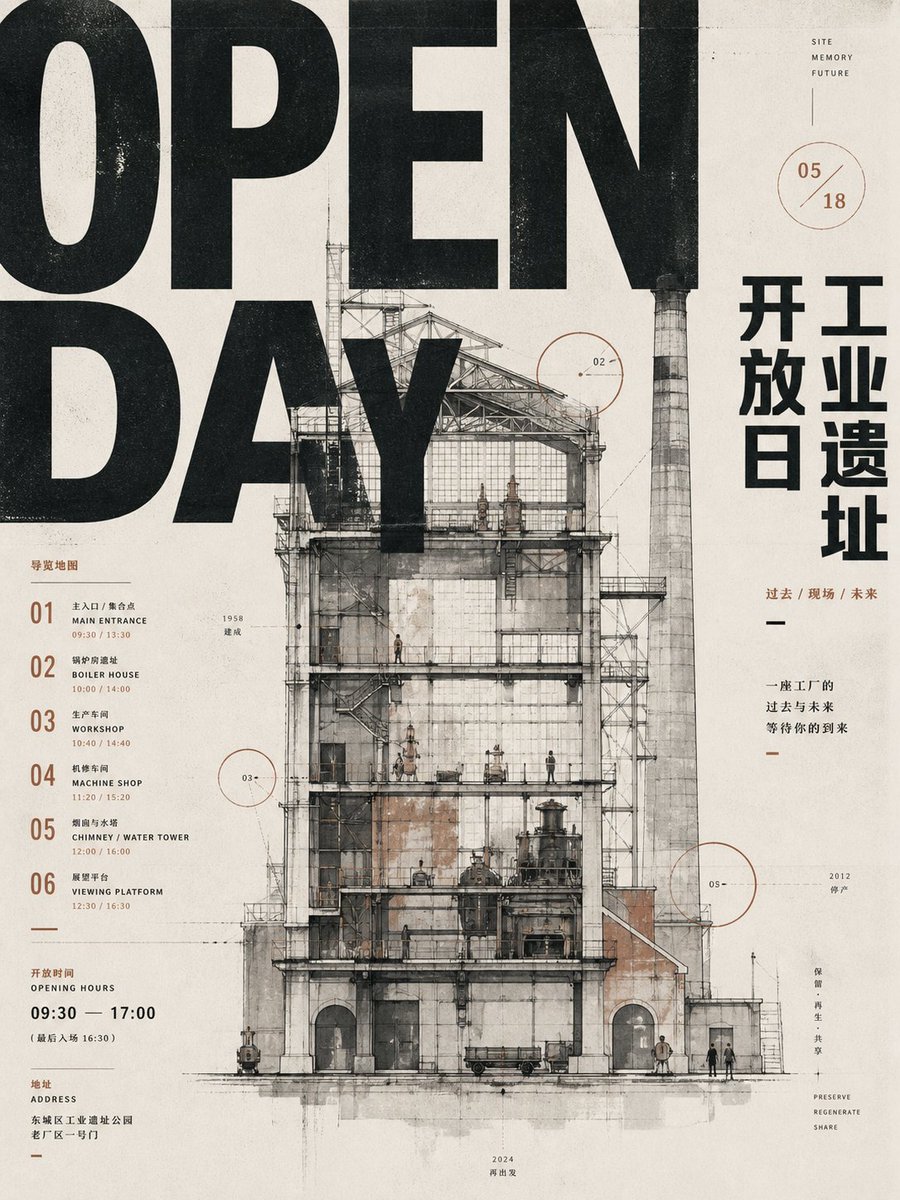
Goal: Create a vertical industrial heritage opening-day poster for {argument name="event name" default="OPEN DAY"}, combining oversized brutal typography, Chinese museum-poster text, architectural cross-section drawing, ink stains, and aged printed-paper texture.
Canvas: Portrait 3:4 poster, off-white warm paper background with visible grain, scratches, speckles, faint fold lines, light gray smudges, and subtle letterpress/risograph misregistration. Use a restrained palette of black, charcoal gray, faded beige, rust brown, and thin red-brown annotation lines.
Layout: Dominant typography fills the upper and left side: huge cropped black condensed sans-serif letters reading “OPEN” across the top and “DAY” beneath it, so large that the words are partially cut off by the canvas edges and overlap the architecture. Center the composition on a detailed old factory building elevation/cutaway, occupying most of the lower two-thirds. Place a tall chimney on the right side of the building, rising into the upper area. Keep the right margin for vertical Chinese title text and small annotations. Keep the left margin for a numbered guide list and opening-hour details.
Main subject: A ruined industrial site rendered as a precise architectural ink-and-watercolor section drawing. Show a tall multi-level factory frame with exposed steel trusses, scaffolding, platforms, staircases, old brick and concrete walls, large rectangular windows, arched ground-floor openings, pipes, tanks, small machinery, rail-cart-like objects, and tiny human figures for scale. Add a very tall cylindrical striped smokestack/chimney to the right, weathered and gray. The building should feel like an open industrial relic being preserved and regenerated, with transparent cutaway floors and visible internal structure.
Text content: Include exactly 6 numbered guide entries on the left, each with a large two-digit number and bilingual-style small labels: 01 Main Entrance, 02 Boiler House, 03 Workshop, 04 Machine Shop, 05 Chimney / Water Tower, 06 Viewing Platform. Include small time ranges next to entries, such as 09:30 / 13:30, 10:00 / 14:00, 10:40 / 14:40, 11:20 / 15:20, 12:00 / 16:00, 12:30 / 16:30. Add an opening-hours block reading “OPENING HOURS 09:30 — 17:00” with smaller Chinese text beneath. Add an address block with small Chinese text. On the right side, add large vertical Chinese characters for {argument name="Chinese title" default="开工 开放日 工业遗址"}, arranged in three stacked columns. Add a small caption reading “过去 / 现场 / 未来” and a short Chinese slogan below it. Add tiny English words near the upper right: “SITE / MEMORY / FUTURE”. Near the lower right add tiny stacked words: “PRESERVE / REGENERATE / SHARE”.
Annotations: Include exactly 3 thin red-brown circular callout graphics labeled 02, 03, and 05 positioned around the building; also include one separate circular date mark near the upper right reading {argument name="date mark" default="05 / 18"}. Add delicate leader lines, small tick marks, microscopic labels, and a few year notes such as 1958, 2012, and 2024.
Visual style: Industrial design poster, architectural blueprint meets ink-wash illustration, archival museum print, worn offset printing, black distressed typography, gridded but asymmetrical Swiss poster composition, subtle rust stains and ink bleeds. The typography should look bold, printed, slightly rough, and physically integrated with the paper. Keep all elements flat and poster-like, not photorealistic.
Constraints: Use exactly one main factory building, exactly one tall chimney, exactly 6 guide-list items, exactly 3 numbered architectural callout circles plus 1 date circle. Avoid bright colors, glossy effects, modern glass architecture, extra logos, QR codes, or watermarks.
설명
A detailed prompt for generating a distressed industrial-site open day poster with giant typography, Chinese layout text, and an architectural factory cutaway.
태그
# YouMind
# gpt-image-2
# image prompt
인기 도구
가장 인기 있는 크리에이티브 도구 살펴보기
Z-Image 편집
이미지를 업로드하고 한 문장으로 변화를 주세요.
지금 시도하기
크리에이티브 엔진
한 문장으로 AI가 무한한 프롬프트 창의성을 제공합니다.
지금 시도하기
이미지 파싱
이미지를 업로드하고 즉시 프롬프트를 받으세요.
지금 시도하기
Z-Image LoRA
여러 LoRA 모델을 결합하여 고유한 AI 예술 작품을 만듭니다
지금 시도하기
Z-Video
Generate creative videos from text or images with AI.
지금 시도하기
AI 이미지 생성기
텍스트를 즉시 멋진 이미지로 변환하세요.
지금 시도하기
스타일 라이브러리
창작물을 위해 엄선된 예술적 스타일을 탐색하세요.
지금 시도하기
배경 제거
AI를 사용하여 배경을 즉시 제거하고 정밀한 누끼 작업을 수행합니다.
지금 시도하기
화질 개선
이미지를 4K/8K로 업스케일링하여 선명한 디테일을 복원합니다.
지금 시도하기
리프레임
AI 아웃페인팅 기술을 사용하여 이미지를 모든 비율로 확장합니다.
지금 시도하기
Camera Angle
Create a new view with continuous 3D camera control.
지금 시도하기
Image Layers
Split an image into editable transparent layers.
지금 시도하기
Image Parallax
Turn one image into interactive parallax animation.
지금 시도하기
이미지 ASCII 변환
브라우저에서 이미지를 사용자 지정 ASCII 아트로 변환하세요.
지금 시도하기
GIF ASCII 변환
움직이는 GIF를 다운로드 가능한 ASCII 애니메이션으로 변환하세요.
지금 시도하기
비디오를 ASCII로
MP4, WebM 또는 MOV 영상을 다운로드 가능한 ASCII 비디오로 변환합니다.
지금 시도하기
비디오 깊이 맵 변환
브라우저에서 비공개 깊이 맵 비디오를 로컬로 만드세요.
지금 시도하기