
프롬프트 라이브러리 / Creative Composite Layering: Character and Background Fusion
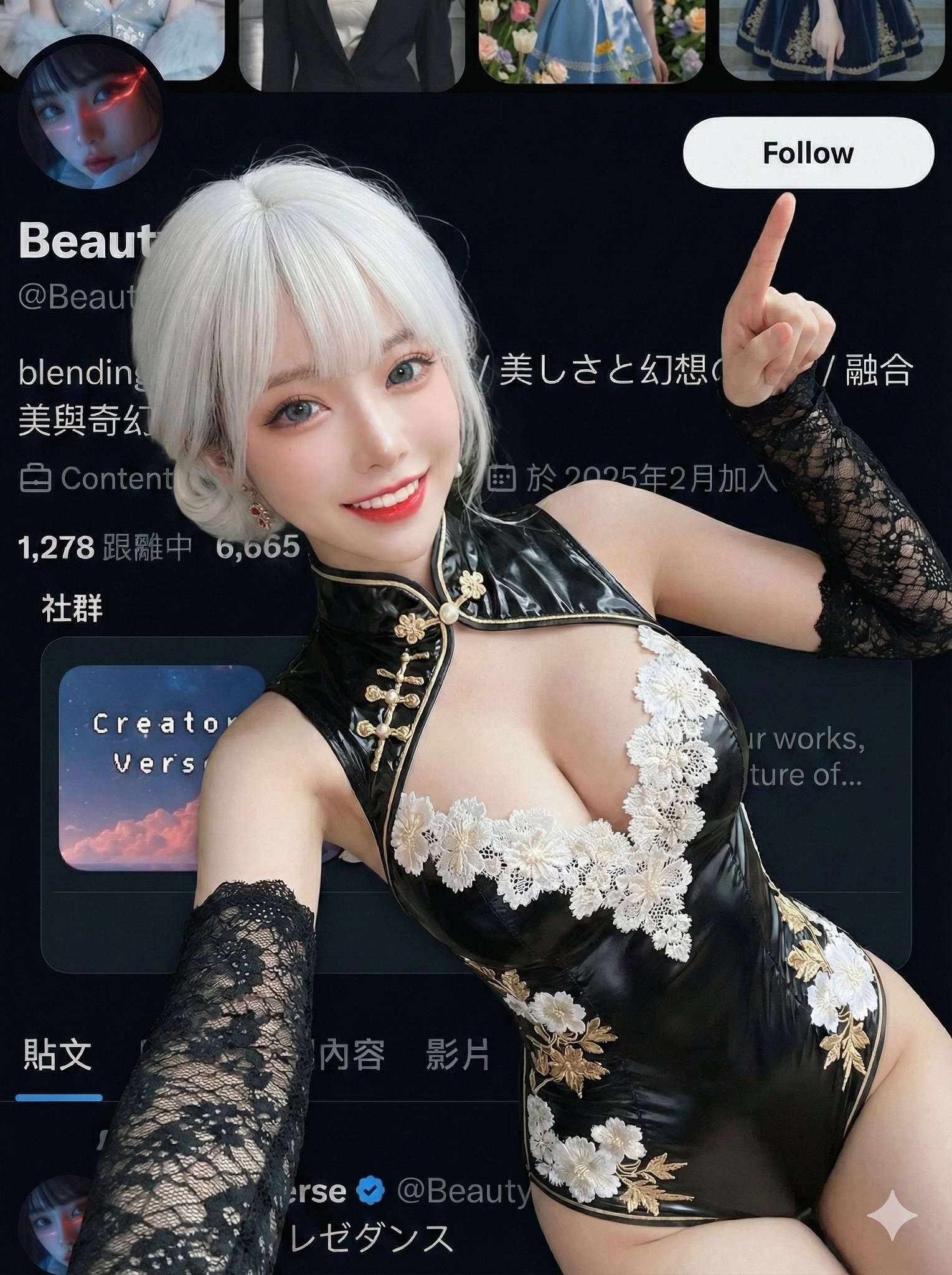
Creative Composite Layering: Character and Background Fusion
작성자:@BeautyVerse_Lab
104607
텍스트-이미지
z-image-turbo
nano banana
nano banana pro
qwen image edit
{
"edit_type": "creative_composite_layering",
"source": {
"_hint": "Base logic: Character (Ref 1) superimposed ON TOP OF the Background Image (Ref 2).",
"mode": "EDIT",
"reference_images": {
"first": "foreground_character_person",
"second": "background_scenery_or_pattern"
},
"preserve_from_first": {
"same_person_or_group": true,
"same_faces": true,
"same_hairstyles": true,
"same_outfits": true
}
},
"identity": {
"keep_identity_consistent": true,
"expression": "bright_engaging_smile_at_camera"
},
"camera_effect": {
"_hint": "High-angle selfie style, creating a sense of depth between the hand and face.",
"perspective": "high_angle_shot_looking_down",
"style": "social_media_call_to_action",
"depth_of_field": "focus_on_face_and_pointing_finger",
"framing": "character_centered_with_space_at_top_right"
},
"pose": {
"_hint": "Key action: Lying down but actively pointing to the 'Follow' button area (Top Right).",
"pose_style": "lying_down_or_reclining_on_back",
"face_direction": "looking_directly_up_into_lens",
"hand_gestures": {
"right_hand_action": "pointing_index_finger",
"target_direction": "upper_right_corner_45_degrees",
"purpose": "mimicking_pressing_subscribe_button",
"arm_position": "extended_towards_camera_top_right"
},
"body_language": "inviting_and_energetic",
"style_tags": [
"kpop_idol_fan_service",
"influencer_promo_style",
"dynamic_perspective"
]
},
"background_integration": {
"_hint": "The second reference image is the background/floor.",
"method": "full_background_replacement",
"target_area": "entire_canvas_behind_character",
"content_source": "reference_image_second",
"perspective_match": "flat_lay_style",
"rules": {
"character_must_be_top_layer": true,
"leave_space_in_upper_right_for_ui": true
}
},
"composition": {
"_hint": "Ensure the pointing finger leads the viewer's eye to the top right corner.",
"visual_flow": "diagonal_line_from_face_to_top_right_corner",
"focal_points": [
"character_eyes",
"pointing_finger_tip"
],
"negative_space": "clear_area_at_top_right_45_degrees"
},
"constraints": {
"no_holding_phone_device": true,
"finger_must_not_be_cropped_out": true,
"ensure_arm_is_natural_length": true "3:4"
}
}
설명
With z-image technology, perfectly fuse the character with the background to create an engaging social media promotional image. High-angle selfie style creates depth between the hand and face, guiding the viewer's eye to the top right corner with an inviting and energetic pose.
태그
# Inviting Energy
# Creative Composite
# Character Background Fusion
# Social Media
# High Angle Selfie
관련 프롬프트

Satirical Cartoon in Ding Cong Style: The Truth Behind AI Celebrities

Hyperrealistic Cinematic Photo of a Woman Stepping Out of a Smartphone Screen
Gym Mirror Selfie Style Analysis

Cyber-Aesthetic Social Media Interface Photo

9:16 Vertical, Futuristic Social-App Interface

Semi-realistic Hand-drawn Store Check-in Poster
인기 도구
가장 인기 있는 크리에이티브 도구 살펴보기
Z-Image 편집
이미지를 업로드하고 한 문장으로 변화를 주세요.
지금 시도하기
크리에이티브 엔진
한 문장으로 AI가 무한한 프롬프트 창의성을 제공합니다.
지금 시도하기
이미지 파싱
이미지를 업로드하고 즉시 프롬프트를 받으세요.
지금 시도하기
Z-Image LoRA
여러 LoRA 모델을 결합하여 고유한 AI 예술 작품을 만듭니다
지금 시도하기
Z-Video
Generate creative videos from text or images with AI.
지금 시도하기
AI 이미지 생성기
텍스트를 즉시 멋진 이미지로 변환하세요.
지금 시도하기
스타일 라이브러리
창작물을 위해 엄선된 예술적 스타일을 탐색하세요.
지금 시도하기
배경 제거
AI를 사용하여 배경을 즉시 제거하고 정밀한 누끼 작업을 수행합니다.
지금 시도하기
화질 개선
이미지를 4K/8K로 업스케일링하여 선명한 디테일을 복원합니다.
지금 시도하기
리프레임
AI 아웃페인팅 기술을 사용하여 이미지를 모든 비율로 확장합니다.
지금 시도하기
Camera Angle
Create a new view with continuous 3D camera control.
지금 시도하기
Image Layers
Split an image into editable transparent layers.
지금 시도하기
Image Parallax
Turn one image into interactive parallax animation.
지금 시도하기
이미지 ASCII 변환
브라우저에서 이미지를 사용자 지정 ASCII 아트로 변환하세요.
지금 시도하기
GIF ASCII 변환
움직이는 GIF를 다운로드 가능한 ASCII 애니메이션으로 변환하세요.
지금 시도하기
비디오를 ASCII로
MP4, WebM 또는 MOV 영상을 다운로드 가능한 ASCII 비디오로 변환합니다.
지금 시도하기
비디오 깊이 맵 변환
브라우저에서 비공개 깊이 맵 비디오를 로컬로 만드세요.
지금 시도하기